Get in touch
I'm always excited to take on new projects and collaborate with innovative minds.
Phone
Website
Address
Lagos
I'm always excited to take on new projects and collaborate with innovative minds.
Lagos
In this article, we’ve explored API Hooking using Microsoft Detours. We discussed how to intercept a simple Windows API function (MessageBoxA), modify its parameters, and then restore the original behavior. The example, though minimal, demonstrates the core principles that underlie more complex hooking scenarios—such as monitoring file access, intercepting network calls etc.
A Comprehensive Guide to Intercepting Windows API Calls
Welcome to this in-depth exploration of API Hooking, a powerful technique that allows developers to intercept and modify the behavior of functions in Windows applications. In this article, we’ll focus on implementing API Hooks using Microsoft’s Detours library—a robust, production‑ready framework for function interception.
Whether you’re a security researcher, a malware analyst, or a developer looking to extend the functionality of existing software, understanding API Hooking is an invaluable skill. We’ll walk through a complete, working example step by step, from the basic concepts to a hands‑on proof‑of‑concept that you can compile and run yourself.
By the end of this article, you will have a solid grasp of how Detours works, how to set up a hook, and how to safely restore the original function. Let’s dive in!
API Hooking is a technique that intercepts calls to Application Programming Interface (API) functions. When an application calls a Windows API function like MessageBoxA, a hook can redirect that call to a custom function—the hook function—before (or instead of) the original API executes.
The hook function can:
Hooking is achieved by modifying the in‑memory code of the target function or by manipulating structures like the Import Address Table (IAT). Detours takes care of the low‑level details, providing a safe and stable way to insert and remove hooks.
It’s important to note that the same techniques used for legitimate software enhancement are also employed by malware authors. Malware may hook security‑related APIs to hide its presence, bypass user‑account control, or steal sensitive data. For example, a keylogger might hook GetMessage to intercept keyboard input, or a rootkit might hook NtQuerySystemInformation to hide its files and processes.
Understanding how hooking works is therefore essential not only for developers but also for defenders who need to detect and analyze such malicious activities. Always use these techniques ethically and only on systems you own or have explicit permission to test.
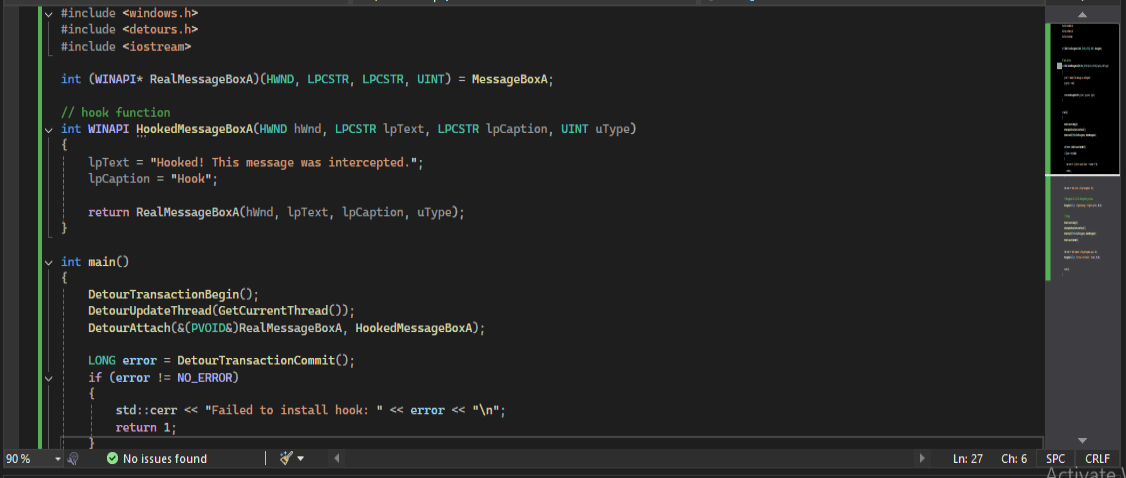
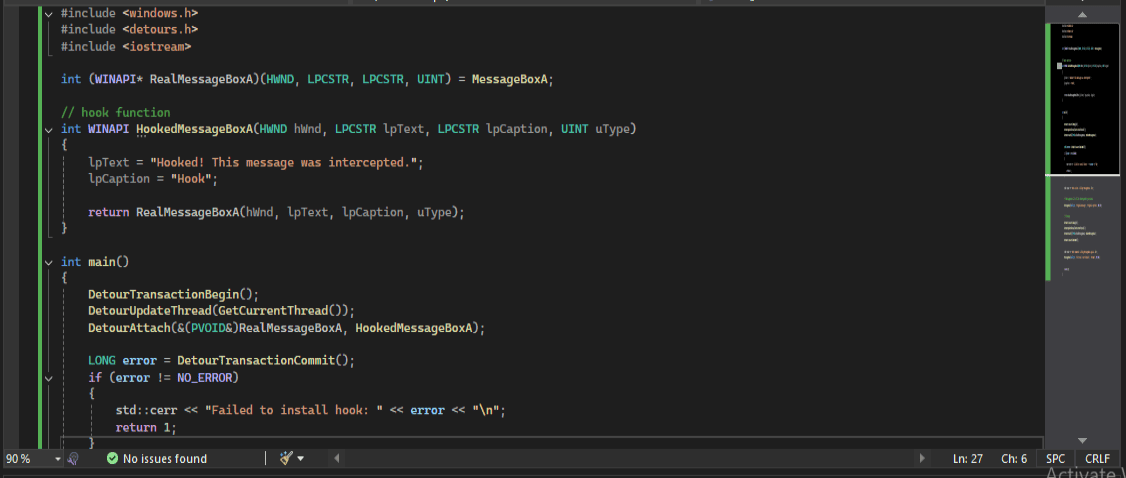
Below is the complete example we’ll be dissecting. It hooks the MessageBoxA function, changes its text and caption, and then restores the original behavior.
#include <windows.h>
#include <detours.h>
#include <iostream>

int (WINAPI* RealMessageBoxA)(HWND, LPCSTR, LPCSTR, UINT) = MessageBoxA;

// hook function
int WINAPI HookedMessageBoxA(HWND hWnd, LPCSTR lpText, LPCSTR lpCaption, UINT uType)
{
    lpText = "Hooked! This message was intercepted.";
    lpCaption = "Hook";

    return RealMessageBoxA(hWnd, lpText, lpCaption, uType);
}

int main()
{
    DetourTransactionBegin();
    DetourUpdateThread(GetCurrentThread());
    DetourAttach(&(PVOID&)RealMessageBoxA, HookedMessageBoxA);

    LONG error = DetourTransactionCommit();
    if (error != NO_ERROR)
    {
        std::cerr << "Failed to install hook: " << error << "\n";
        return 1;
    }

    std::cout << "Hook active. Calling MessageBoxA...\n";

    // MessageBoxA Call will be intercepted by our hook.
    MessageBoxA(nullptr, "Original message", "Original caption", MB_OK);

    // cleanup
    DetourTransactionBegin();
    DetourUpdateThread(GetCurrentThread());
    DetourDetach(&(PVOID&)RealMessageBoxA, HookedMessageBoxA);
    DetourTransactionCommit();

    std::cout << "Hook removed. Calling MessageBoxA again...\n";
    MessageBoxA(nullptr, "This one is not hooked.", "Normal", MB_OK);

    return 0;
}Let’s break down the code section by section.
include <windows.h>
include <detours.h>
include <iostream>int (WINAPI RealMessageBoxA)(HWND, LPCSTR, LPCSTR, UINT) = MessageBoxA;We declare a function pointer named RealMessageBoxA that matches the signature of MessageBoxA. It is initialized to point to the original MessageBoxA function. This pointer will later be used to call the original function from inside our hook.
int WINAPI HookedMessageBoxA(HWND hWnd, LPCSTR lpText, LPCSTR lpCaption, UINT uType)
{
lpText = "Hooked! This message was intercepted.";
lpCaption = "Hook";

return RealMessageBoxA(hWnd, lpText, lpCaption, uType);
}DetourTransactionBegin();
DetourUpdateThread(GetCurrentThread());
DetourAttach(&(PVOID&)RealMessageBoxA, HookedMessageBoxA);
LONG error = DetourTransactionCommit();Detours uses a transaction model to ensure thread‑safe hook installation.
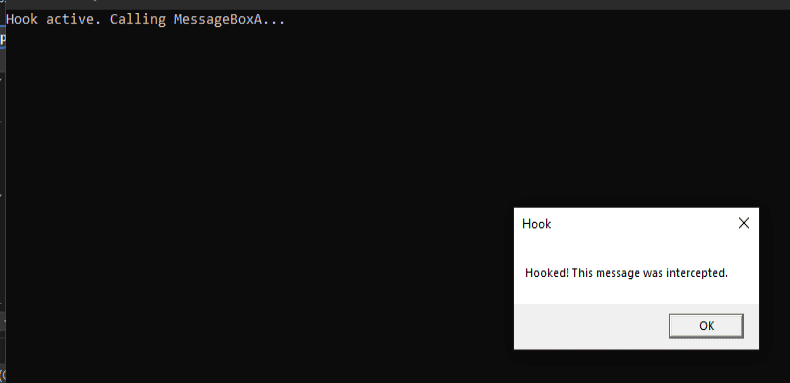
MessageBoxA(nullptr, "Original message", "Original caption", MB_OK);At this point, any call to MessageBoxA in this thread will be redirected to our HookedMessageBoxA. The message box that appears will display “Hooked! This message was intercepted.” with the caption “Hook”.
DetourTransactionBegin();
DetourUpdateThread(GetCurrentThread());
DetourDetach(&(PVOID&)RealMessageBoxA, HookedMessageBoxA);
DetourTransactionCommit();
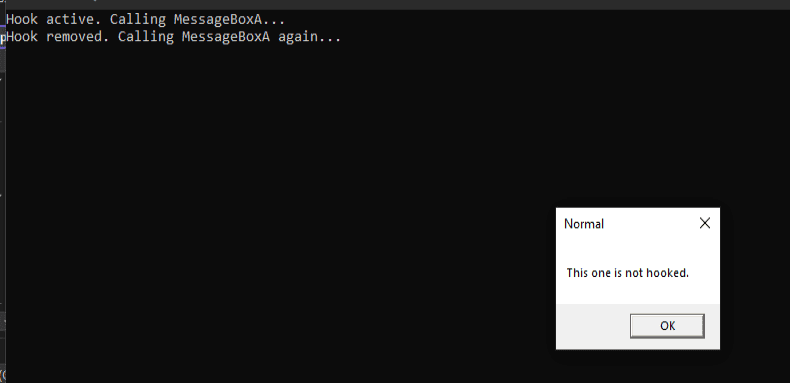
We start a new transaction, detach the hook (restoring the original address), and commit. After this, subsequent calls to MessageBoxA behave normally.
MessageBoxA(nullptr, "This one is not hooked.", "Normal", MB_OK);This message box will show the original parameters, confirming the hook is gone.
Now let’s see the code in action. I’ll walk through the steps and show what happens when you compile and run this program.
Make sure you have the Detours library installed and the correct paths set. Using the Microsoft C++ compiler (cl.exe) from a Developer Command Prompt:
bash
cl /EHsc hook_example.cpp /I "path\to\detours\include" /link /LIBPATH:"path\to\detours\lib.x86" detours.lib user32.lib(Adjust the architecture – lib.x64 for 64‑bit – and ensure you’re linking against the correct import library.)
When you launch the program, you’ll see console output similar to:
Hook active. Calling MessageBoxA...A message box will pop up. Despite our code passing "Original message" and "Original caption", the box actually displays:
Text: Hooked! This message was intercepted.
Caption: Hook
This proves that the hook intercepted the call and modified the parameters.
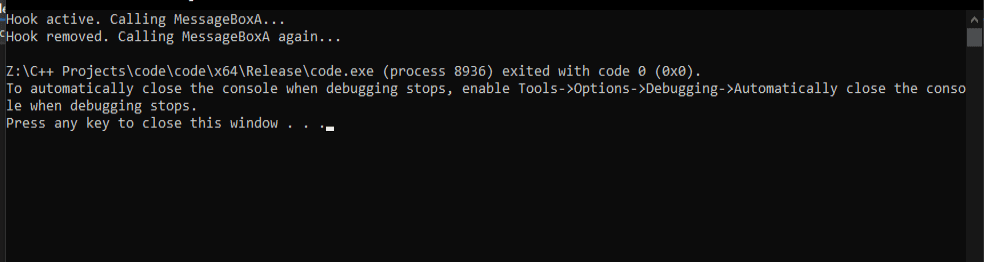
In the original example, the author included a getchar() to pause execution. Our current code doesn’t have that, so the program continues immediately. After the hooked message box is closed, the console prints:
Hook removed. Calling MessageBoxA again...A second message box appears, this time with the original text "This one is not hooked." and caption "Normal". The hook is gone.
In this article, we’ve explored API Hooking using Microsoft Detours. We’ve seen how to intercept a simple Windows API function (MessageBoxA), modify its parameters, and then restore the original behavior. The example, though minimal, demonstrates the core principles that underlie more complex hooking scenarios—such as monitoring file access, intercepting network calls, or extending the functionality of third‑party applications.
From here, you could:
API Hooking is a deep and fascinating subject, and Detours is an excellent starting point for mastering it. I hope this guide has given you the confidence to experiment further.
If you found this article helpful, feel free to share it with others who might benefit. Remember to always stay curious, keep learning, and use your knowledge for good.
Your email address will not be published. Required fields are marked *